The English-language version of the facilities guide is available at the counter
Browsing
Library Map:
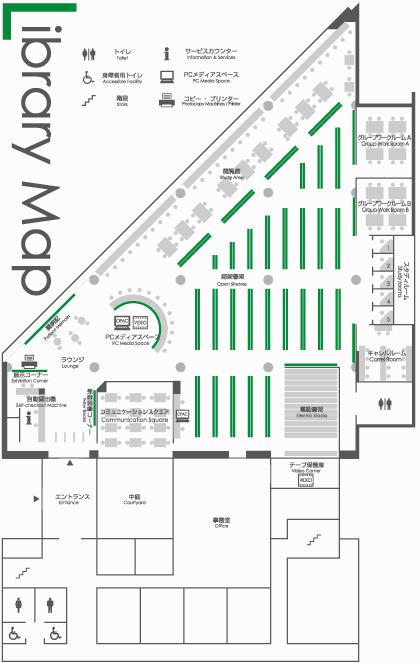
Guide to Methods for Searching for Materials:
Document acquisition flow chart:
Copying
- 2 copy machines (coin-operated)
Charges per page
B/W 10 yen
Color 30 yen (50 yen)
- The copy machines are self-service.
- The library does not break bills into coins.
- Please fill out and submit the “Application for Copies” when copying library materials.
- You may copy books and magazines within the following scope in accordance with Article 31 of the Copyright Act:
- The user will use the copies personally for research purposes
- The copy is only part of the material
- Only one set of copies is made per material
Use of audio-visual materials
- Materials accompanying books can be borrowed.
- Videos and other individual audio-visual materials cannot be borrowed (except by faculty).
- Use PC Media Space or VIDEO/DVD players in Carrel Room, Group Work Rooms to watch/listen to them.(Headphones are available at service counter.)
Study Area / Lounge
- Please feel free to use the seats.
Wireless LAN usage area
- Campus wireless LAN is available in the library.
- Note: Users not associated with the university may bring PCs in and use them, but the wireless LAN is not available. Bring a charged battery.
Facilities
PC Media Space
- 16 terminals in PC Media Space. (2 for research purposes only)
Information may be printed for a fee.
Note for users not associated with the university:
- Use the designated terminal.
- Some databases and electronic journals may not be used due to contractual limitations.
- USB memory sticks and other external storage devices may not be used.
- University users are given priority for using search terminals.
Study Room
- 5 rooms: Private rooms for people who want to study quietly.
Group Work Room A/B
- 2 room: A room for group discussions and study. Multiple groups may be asked to share the room.
- Mobile whiteboards and DVD players are available in the room.
Carrel Room
- 1 room: A room for people who want to study quietly.
- 14 seats for study and 2 seats for use of audio-visual materials.
- Please wear headphones when watching audio-visual materials.
Communication Square
- 1 room: A room for group discussions and study.
- It needs a reservation to use the room by a group of more than 5 people.
- Projector and projector screen are available.
Note: Users not affiliated with the university may only use PC Media Space.
Reserving Library Facilities for Exclusive Use
Communication Square and Group Work Rooms A and B (faculty only) can be reserved for exclusive use.
Communication Square
- Number of seats: 18 (chairs can be added)
- Number of people for exclusive use reservations: Five or more
- Note: No restrictions apply to faculty in this regard, however.
Equipment available for use: Projector, screens (ceiling mounted or standing), DVD player, lectern
Group Work Rooms A and B (only faculty can apply)
- Number of seats: 15 in Group Work Room A and 16 in B (chairs can be added in either room)
- Equipment available for use: Projector, standing screen, DVD and VHS players, lectern
Note: When using the projector in Communication Square, please bring a notebook PC with an HDMI-compatible connector or use one of the notebook PCs that can be borrowed from the library. If you want to use a library notebook PC, please complete the procedures for checking one out at the counter.
To Apply
Application for use of Health Science Library facilities (Excel file (Microsoft Excel24.3KB), PDF file (Adobe PDF71.2KB))
Please fill in the above form and apply by either bringing it directly to the library counter or attaching it to an email.
Apply to: library(at)tmu.ac.jp
Please change "(at)" to "@".
Instructions for Use of Health Science Library
- Covered and capped beverages are permitted in the library except in the areas around book shelves, PCs and peripheral devices.
- Eating and smoking is not permitted in any area of the library.
- The use of cameras and mobile phones is prohibited.